
Create a JWT
Learn to create a function or class that generates a JWT for authorising your app to receive push notifications from Dotdigital Marketing.
Our mobile SDKs use JSON Web Tokens (JWT) to authenticate your app. A JWT is a common method that provides authentication and authorisation with one simple token.
In your code, you must create a function that generates a valid JWT. The function uses the JWT authorisation details from your push notification profile, and a cryptographic nonce that we pass to it. We refer to this function as the challenge function.
Required JWT claims
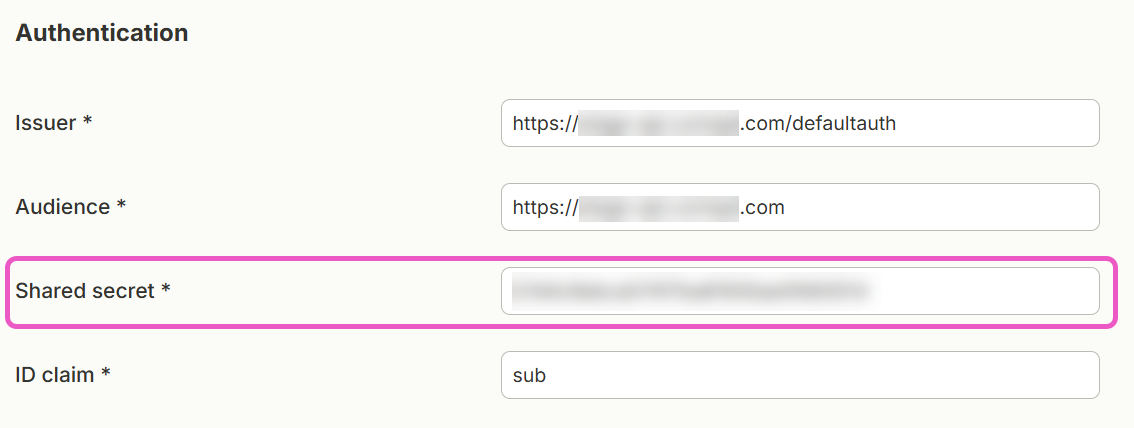
The claims in your JWT must include the following values. You find these values in the Authentication fields of the push notification profile that you set up in Dotdigital Marketing. This applies to all providers and methods that you use to create a JWT.
| JWT claim | Value |
|---|---|
iss | The Issuer value from your Dotdigital Marketing push notification profile. For example, https://api.comapi.com/defaultauth |
aud | The Audience value from your Dotdigital Marketing push notification profile. For example, https://api.comapi.com |
sub | A unique and consistent identifier for the user, such as a user ID or an email address. The claim name must match the ID claim field in your profile. The default name is sub. |
nonce | The nonce value that the SDK passes to your challenge function. The nonce makes each token different. |
The role of the sub claim
The sub claim identifies the push profile. Dotdigital Marketing associates this push profile with your contact when you set the email address on the profile.
The sub value must be unique for each user. If possible, keep the same value for each user. If a user opens your app on more than one device, all of these devices are then grouped under the same push profile ID. When you send a push message to the contact, Dotdigital Marketing sends it to all of the user's devices.
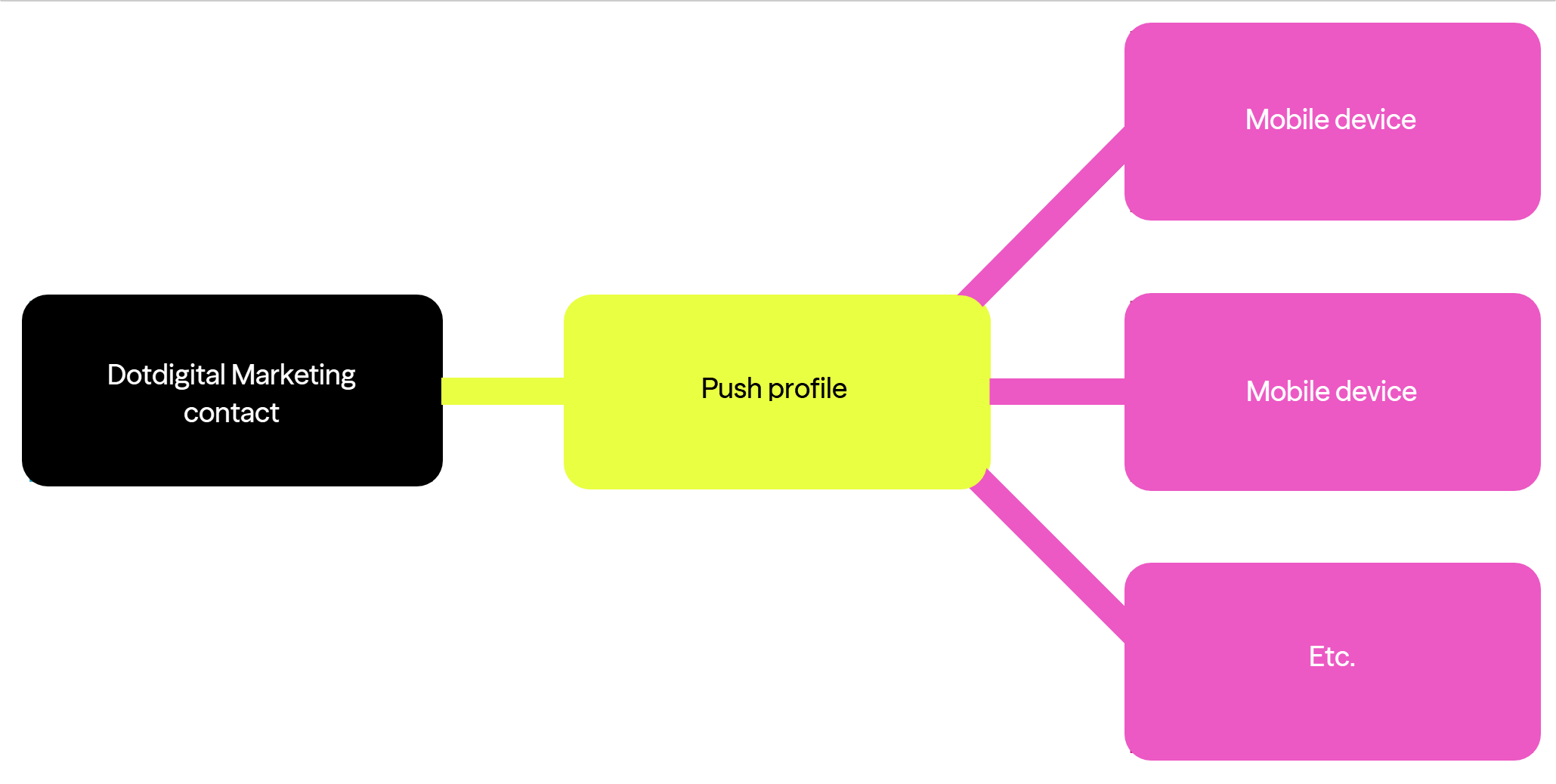
Using a unique and consistent value per user for the sub claim
You may not be able to allocate a unique and consistent sub value for a user. This can happen if your app allows anonymous users. In this case, use a unique and consistent identifier for the device, such as a GUID that you store in the app. Contacts are then restricted to one device for push messages.
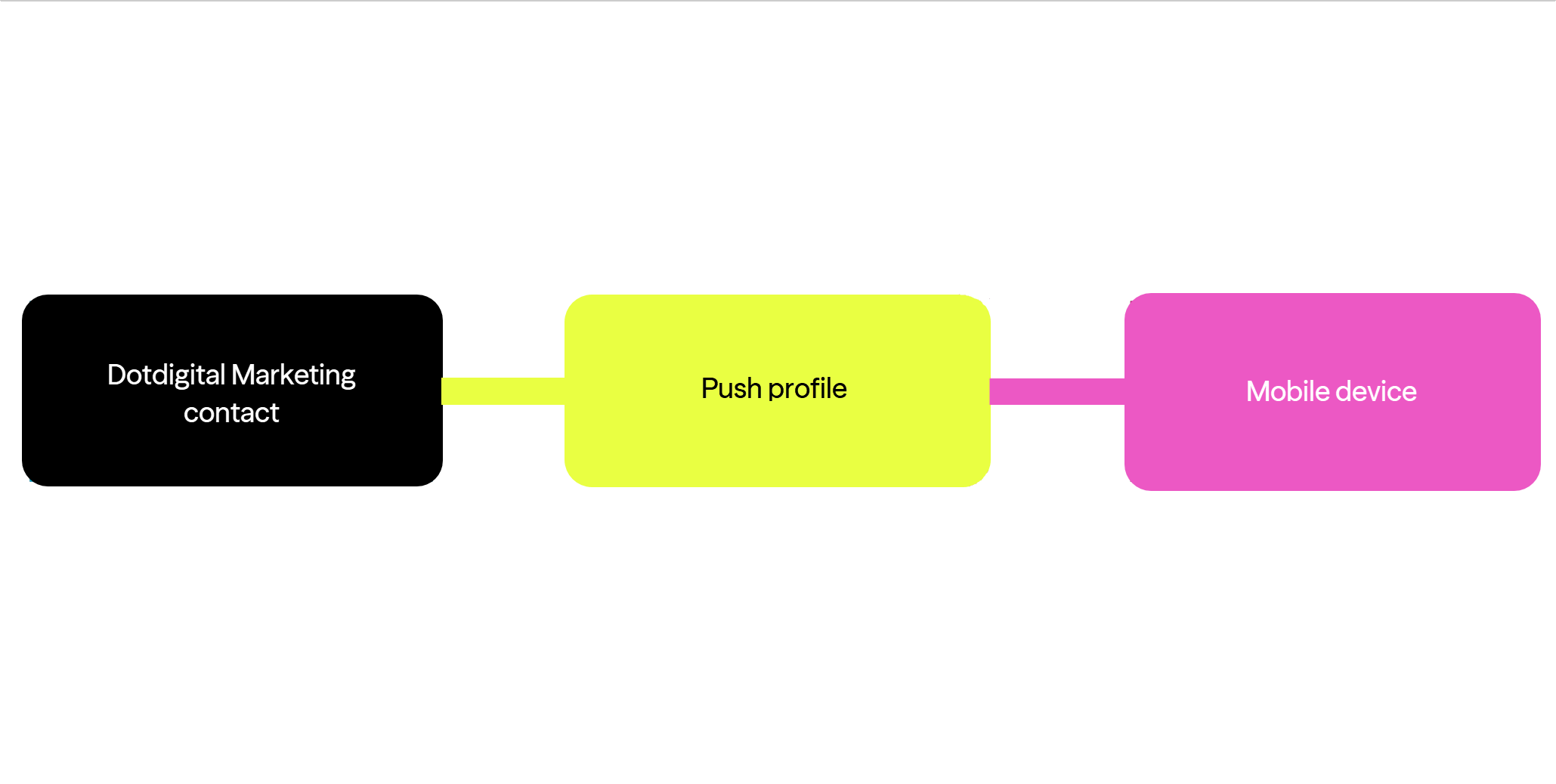
Using a random, unique, consistent value for the sub claim per device
Ensure yoursubclaim is unique and consistent per userThe value that you pass in the
subclaim is the unique user ID. You cannot change it later. Make sure that the value is unique for each user. If possible, make sure that the value does not change between installations.
Which push profile is associated with my contact?Dotdigital Marketing creates a PUSHOPTIN_xxx field automatically for your contacts when you set up your push notification channel. This field contains the push profile ID that is associated with a contact.
Signing the JWT
You digitally sign a JWT to prove that a trusted party issued it. Sign the JWT with the value of the Shared secret field from your push notification profile, and with the nonce that we pass to your function.
Nonces
Your JWT provider must use a cryptographic nonce when it creates the token. The nonce makes sure that tokens always look different, even when they contain the same claims. This is a common security practice with cryptography.
The SDK passes the nonce as an argument to your challenge function. This happens when the SDK initialises and you create or retrieve a JWT for your app user.
Important security noteDo not hard code your shared secret on the client side. Store this value on the server side.
Sample code
The following example code shows how to create a challenge function and a self-issued JWT.
Android JWT code sample
JWT provider: Java JWT.
Any class that you create to generate a JWT must extend the ComapiAuthenticator class.
All logic that creates the JWT must be inside the onAuthenticationChallenge() method. This method takes two parameters: AuthClient and ChallengeOptions.
To get the value of the nonce, call the ChallengeOptions.getNonce() method.
When your JWT is returned, pass it to the authenticateWithToken() method of the AuthClient object.
Add the following dependencies to your project's Gradle build file:
dependencies {
    api('io.jsonwebtoken:jjwt-api:0.13.0')
    runtimeOnly('io.jsonwebtoken:jjwt-impl:0.13.0')
    runtimeOnly('io.jsonwebtoken:jjwt-orgjson:0.13.0') {
        exclude(group: 'org.json', module: 'json') //provided by Android natively
    }
}
dependencies {
api("io.jsonwebtoken:jjwt-api:0.13.0")
runtimeOnly("io.jsonwebtoken:jjwt-impl:0.13.0")
runtimeOnly("io.jsonwebtoken:jjwt-orgjson:0.13.0") {
exclude(group = "org.json", module = "json") // provided by Android natively
}
}This is the sample class for a ChallengeHandler:
package com.example.testapp;

import com.comapi.ComapiAuthenticator;
import com.comapi.internal.network.AuthClient;
import com.comapi.internal.network.ChallengeOptions;
import io.jsonwebtoken.Jwts;
import io.jsonwebtoken.security.Keys;

import java.nio.charset.StandardCharsets;
import java.util.HashMap;
import java.util.Map;
import java.util.concurrent.TimeUnit;
import javax.crypto.SecretKey;

public class ChallengeHandler extends ComapiAuthenticator {

    @Override
    public void onAuthenticationChallenge(AuthClient authClient, ChallengeOptions challengeOptions) {
        try {
            // <Shared secret> string must be the same as the value of the 'Shared secret' field
            // in your push notification profile in Dotdigital Marketing.
            byte[] data = "<Shared secret>".getBytes(StandardCharsets.UTF_8);
            SecretKey key = Keys.hmacShaKeyFor(data);

            Map<String, Object> claims = new HashMap<>();
            claims.put("nonce", challengeOptions.getNonce());
            // ID claim name must match the 'ID claim' field in your Dotdigital Marketing push notification
            // profile (default: 'sub'). Value must be a consistent unique identifier for the app user.
            claims.put("sub", "<Unique consistent app user id>");
            // <Audience> must match the 'Audience' field in your Dotdigital Marketing push notification profile.
            claims.put("aud", "<Audience>");
            // <Issuer> must match the 'Issuer' field in your Dotdigital Marketing push notification profile.
            claims.put("iss", "<Issuer>");
            // 'iat' and 'exp' must be in seconds since the epoch, not milliseconds.
            long nowSeconds = System.currentTimeMillis() / 1000L;
            claims.put("iat", nowSeconds);
            claims.put("exp", nowSeconds + TimeUnit.DAYS.toSeconds(30));

            String token = Jwts.builder()
                    .header()
                        .type("JWT")
                        .and()
                    .claims(claims)
                    .signWith(key, Jwts.SIG.HS256)
                    .compact();

            // Pass the JWT to the SDK.
            authClient.authenticateWithToken(token);
        } catch (Exception e) {
            e.printStackTrace();
            // Authorisation failed.
            authClient.authenticateWithToken(null);
        }
    }
}
package com.example.testapp
import com.comapi.ComapiAuthenticator
import com.comapi.internal.network.AuthClient
import com.comapi.internal.network.ChallengeOptions
import io.jsonwebtoken.Jwts
import io.jsonwebtoken.security.Keys
import java.util.concurrent.TimeUnit
class ChallengeHandler : ComapiAuthenticator() {
override fun onAuthenticationChallenge(authClient: AuthClient, challengeOptions: ChallengeOptions) {
try {
// <Shared secret> string must be the same as the value of the 'Shared secret' field
// in your push notification profile in Dotdigital Marketing.
val data = "<Shared secret>".toByteArray(Charsets.UTF_8)
val key = Keys.hmacShaKeyFor(data)
// 'iat' and 'exp' must be in seconds since the epoch, not milliseconds.
val nowSeconds = System.currentTimeMillis() / 1000L
val claims = mapOf(
"nonce" to challengeOptions.nonce,
// ID claim name must match the 'ID claim' field in your Dotdigital Marketing push notification
// profile (default: 'sub'). Value must be a consistent unique identifier for the app user.
"sub" to "<Unique consistent app user id>",
// <Audience> must match the 'Audience' field in your Dotdigital Marketing push notification profile.
"aud" to "<Audience>",
// <Issuer> must match the 'Issuer' field in your Dotdigital Marketing push notification profile.
"iss" to "<Issuer>",
"iat" to nowSeconds,
"exp" to nowSeconds + TimeUnit.DAYS.toSeconds(30)
)
val token = Jwts.builder()
.header()
.type("JWT")
.and()
.claims(claims)
.signWith(key, Jwts.SIG.HS256)
.compact()
// Pass the JWT to the SDK.
authClient.authenticateWithToken(token)
} catch (e: Exception) {
e.printStackTrace()
// Authorisation failed.
authClient.authenticateWithToken(null)
}
}
}
Generate your JWT on the server sideThese samples create the JWT in the app to keep the example short. In a production app, request the JWT from your backend server with an HTTP call. This keeps your shared secret off the device.
iOS JWT code sample
JWT provider: the JWT library.
The following example shows a token generator in Objective-C and Swift.
#import "CMPAuthenticationManager.h"
#import <JWT/JWT.h>

@implementation CMPAuthenticationManager

+ (NSString *)generateTokenForNonce:(NSString *)nonce profileID:(NSString *)profileID issuer:(NSString *)issuer audience:(NSString *)audience secret:(NSString *)secret {
    NSDate *now = [NSDate date];
    NSDate *exp = [NSCalendar.currentCalendar dateByAddingUnit:NSCalendarUnitDay value:30 toDate:now options:0];

    NSDictionary *headers = @{@"typ" : @"JWT"};
    /* Claims notes:
       The ID claim name must be the same as the value of the 'ID claim' field in your push notification
       profile in Dotdigital Marketing. The default value is 'sub'. The value of the claim must be a
       consistent unique value for the app user.

       The 'aud' audience claim must be the same as the value of the 'Audience' field in your push
       notification profile in Dotdigital Marketing.

       The 'iss' issuer claim must be the same as the value of the 'Issuer' field in your push
       notification profile in Dotdigital Marketing.
    */
    NSDictionary *payload = @{@"nonce" : nonce,
                               @"sub" : profileID,
                               @"iss" : issuer,
                               @"aud" : audience,
                               @"iat" : [NSNumber numberWithDouble:now.timeIntervalSince1970],
                               @"exp" : [NSNumber numberWithDouble:exp.timeIntervalSince1970]};

    NSData *secretData = [secret dataUsingEncoding:NSUTF8StringEncoding];
    id<JWTAlgorithm> algorithm = [JWTAlgorithmFactory algorithmByName:@"HS256"];

    NSString *token = [JWTBuilder encodePayload:payload].headers(headers).secretData(secretData).algorithm(algorithm).encode;
    return token;
}

@end

/* Generate this token on your backend server. The app must only retrieve the token through an HTTP call. */
import JWT
class JWTokenGenerator {
struct AuthHeaders {
static let HeaderType = "JWT"
}
static func generate(tokenFor nonce: String, profileId: String, issuer: String, audience: String, secret: String) -> String {
let now = Date()
let exp = Calendar.current.date(byAdding: .day, value: 30, to: now)!
let base64SecretKey = secret.data(using: .utf8)!
let headers = ["typ" : NSString.init(string: AuthHeaders.HeaderType)] as [AnyHashable : Any]
/* Claims notes:
The ID claim name must be the same as the value of the 'ID claim' field in your push notification
profile in Dotdigital Marketing. The default value is 'sub'. The value of the claim must be a
consistent unique value for the app user.
The 'aud' audience claim must be the same as the value of the 'Audience' field in your push
notification profile in Dotdigital Marketing.
The 'iss' issuer claim must be the same as the value of the 'Issuer' field in your push
notification profile in Dotdigital Marketing.
*/
let claims = ["nonce" : NSString.init(string: nonce),
"sub" : NSString.init(string: profileId),
"iss" : NSString.init(string: issuer),
"aud" : NSString.init(string: audience),
"iat" : NSNumber(value: now.timeIntervalSince1970),
"exp" : NSNumber(value: exp.timeIntervalSince1970)] as [AnyHashable : Any]
let algorithm = JWTAlgorithmFactory.algorithm(byName: "HS256")
let e = JWTBuilder.encodePayload(claims)!
let h = e.headers(headers)!
let s = h.secretData(base64SecretKey)!
let b = s.algorithm(algorithm)!
let token = b.encode
return token!
}
}
/* Generate this token on your backend server. The app must only retrieve the token through an HTTP call. */JavaScript JWT code sample
JWT provider: the jsrsasign library.
To get the value of the nonce, use the nonce property of the first parameter.
When your JWT is returned, pass it to the answerAuthenticationChallenge() function. This is the second parameter of your challengeHandler() function.
function challengeHandler (options, answerAuthenticationChallenge) {
    // Header
    var oHeader = { alg: 'HS256', typ: 'JWT' };
    // Payload
    var tNow = KJUR.jws.IntDate.get('now');
    var tEnd = KJUR.jws.IntDate.get('now + 1day');

    var oPayload = {
        // The ID claim name must match the 'ID claim' field in your Dotdigital Marketing push notification
        // profile (default: 'sub'). The value must be a consistent unique value for the app user.
        sub: "<Unique consistent app user id>",
        nonce: options.nonce,
        // 'aud' must match the 'Audience' field in your Dotdigital Marketing push notification profile.
        aud: "<Audience>",
        // 'iss' must match the 'Issuer' field in your Dotdigital Marketing push notification profile.
        iss: "<Issuer>",
        iat: tNow,
        exp: tEnd,
    };
    var sHeader = JSON.stringify(oHeader);
    var sPayload = JSON.stringify(oPayload);
    // <Shared secret> string must match the 'Shared secret' field in your Dotdigital Marketing push notification profile.
    var sJWT = KJUR.jws.JWS.sign("HS256", sHeader, sPayload, {utf8: "<Shared secret>"});
    answerAuthenticationChallenge(sJWT);
}
Be careful with the secret value being automatically cast to hexThe jsrsasign library checks the secret field to see if it is a hexadecimal number. We always use string based secrets. To stop this unwanted automatic cast, always cast the secret value to a UTF-8 string with this operation:
{utf8: <Your secret value>}.A common indication of this problem is a 403 - Invalid JWT error when you try to start a session with the SDK.
Updated 27 days ago